Example Backend App for BigCommerce
The below documentation and code library is a working example of how you can integrate the headless calculator into your ecommerce platform as a quickstart guide to building your own custom integration with Credit Master 3 (CM3).
- Getting Started
- Install backend PHP app on a server
- Enable Gift Certificates
- Add widget to product page
- Add widget to cart page
- Custom Script - Create checkout with finance object
- User Completes Checkout
- Success Page
- Get CM3 url
- User Completes CM3 as normal
- User redirected to BigCommerce, with the finance application status shown here
Getting Started
This guide focuses on installing and configuring the backend app that will communicate with CM3. It uses BigCommerce as a sample platform - every platform will have different installation requirements.
Before we get started, you should first generate your services config here.
Then follow these instructions to configure and install your headless calculator on the frontend of your website.
Install backend PHP app on a server
The first step is to install our sample app on a server that supports PHP 7.4
There are two entry points to our demo application:
- pbf.php - this creates a cart with finance in BigCommerce
- applypbf.php - this generates a link to complete the finance application in CM3
The sample code can be found here: headless-calc-bigcommerce-demo.zip
Our only dependency in the repository is guzzle, it can be installed by running composer in the root directory:
composer install
Your BigCommerce, Credit Master 3 (CM3) credentials and hash secret should be defined in credentials.php. To create/copy the file run:
cp credentials.php.dev credentials.phpThen replace the details as needed.
Both URLs are loaded via AJAX, so CORS will need to be disabled/restricted. An open example in nginx would be:
location ~* \.(php)$ {
    add_header Access-Control-Allow-Origin *;
}
You can restrict this further once you know the BigCommerce store URL.
Enable Gift Certificates
In order for this demo app to work, gift certificates need to be enabled.
You can enable it in Marketing > Gift Certificates
Add widget to product page
You should take the financeCalculator snippet and add it to the product view page in BigCommerce.
If you have already added this snippet in the previous section, then replace the snippet rather than add it.
One important addition to note is the finance_js_button, this will reveal a PayByFinance button and allow us to execute our custom javascript function.
Since we are working with BigCommerce Cornerstone theme, we ask it to trigger:
function () { document.getElementById('form-action-addToCart').click(); }
This uses the native BigCommerce add to cart functionality so we can continue to pay for this item by finance.
Edit file: templates/components/products/product-view.html
<div id="pbf_calculator_container"> </div>
<script type="text/javascript">// <![CDATA[
financeCalculator({
        target: "div#pbf_calculator_container",
        config: "{{cdn '/assets/js/theme/finance-calculator/pbf-calculator-config.json'}}",
        loan_amount_target: "span.price.price--withTax",
        finance_js_button: function () { document.getElementById('form-action-addToCart').click(); },
        rep_example:{
            // amount: 1000,
            cash_price: 8000,
            deposit: 750,
            loan_amount: 5000,
            apr: 9.9,
            interest_rate: 10,
            term: 12,
            instalment_amount: 400,
            total_term: 10,
            credit_charge: 500,
            total_amount_payable: 200
        }
    });
// ]]></script>
Add widget to cart page
The cart can be installed by following the instructions in the documentation.
In our case, we can use a built in function finance_button which will post a request to the URL provider and then redirect to the redirect_to json response from the API call.
Add this here: templates/pages/cart.html
If you have already added this snippet in the previous section, then replace the snippet rather than add it.
<div id="pbf_calculator_container"> </div>
<script type="text/javascript">// <![CDATA[
financeCalculator({
        target: "div#pbf_calculator_container",
        config: "{{cdn '/assets/js/theme/finance-calculator/pbf-calculator-config.json'}}",
        loan_amount_target: ".cart-total-value.cart-total-grandTotal",
        finance_button: "https://bc-headless-demo.dbhq.tech/pbf.php?cart_id={{ cart_id }}",
        rep_example:{
            // amount: 1000,
            cash_price: 8000,
            deposit: 750,
            loan_amount: 5000,
            apr: 9.9,
            interest_rate: 10,
            term: 12,
            instalment_amount: 400,
            total_term: 10,
            credit_charge: 500,
            total_amount_payable: 200
        }
    });
// ]]></script>
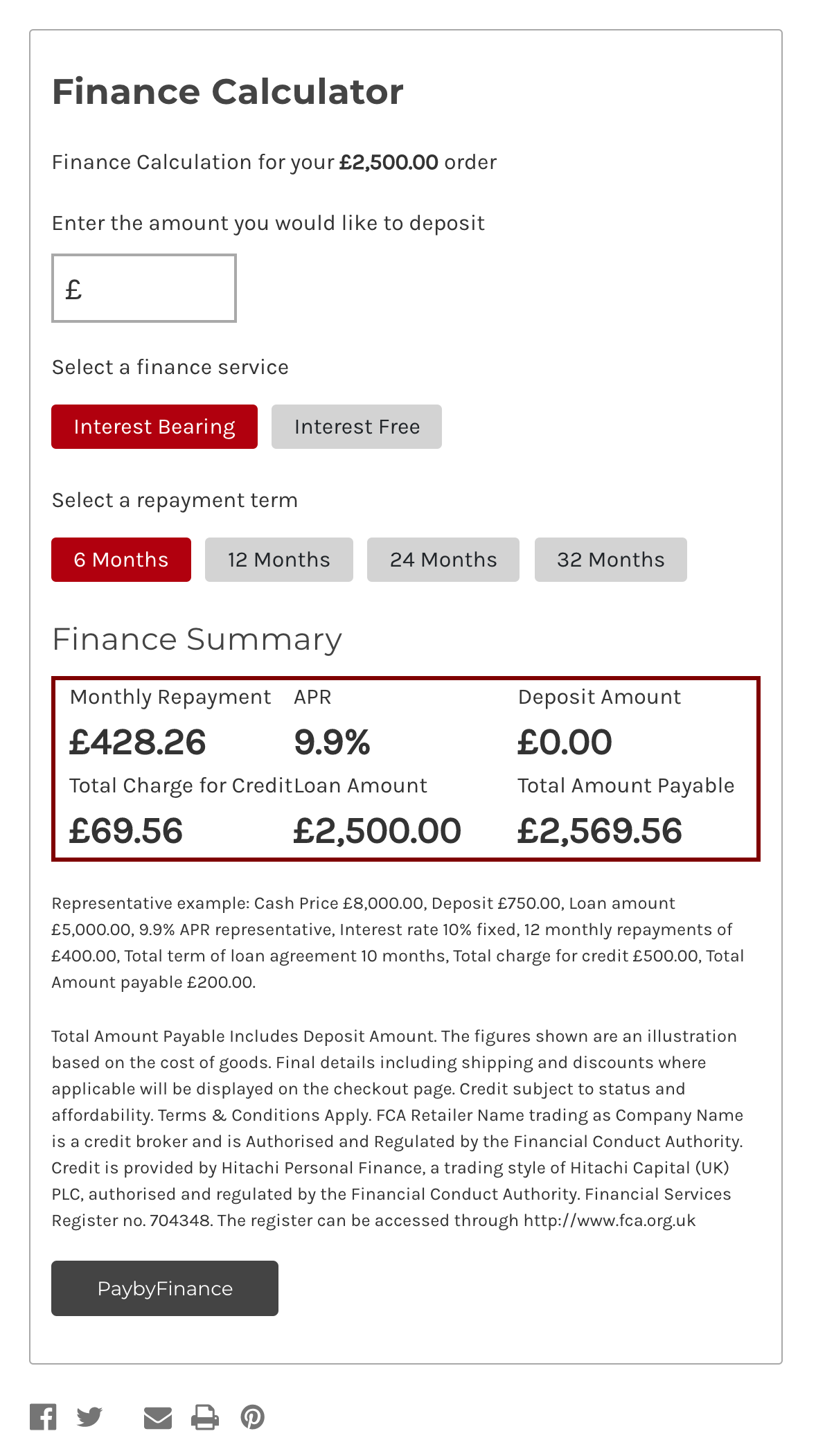
Custom Script - Create checkout with finance object
Refer to pbf.php for full details.
This must return a hash which is a signed secret of the finance object. This helps to make sure that a malicious user can not adjust the order after it is created.
This pbf.php script does these actions:
- Takes in finance details from headless widget
- Reads current cart data from BigCommerce
- Creates a new cart and adds finance, by utilising the gift_certificate mechanic
- Passes back a signed hash to confirm the finance object won't change, along with a redirect_to variable for our frontend script to redirect the user to a checkout to pay for this new cart.
User Completes Checkout
The user will then complete checkout as normal
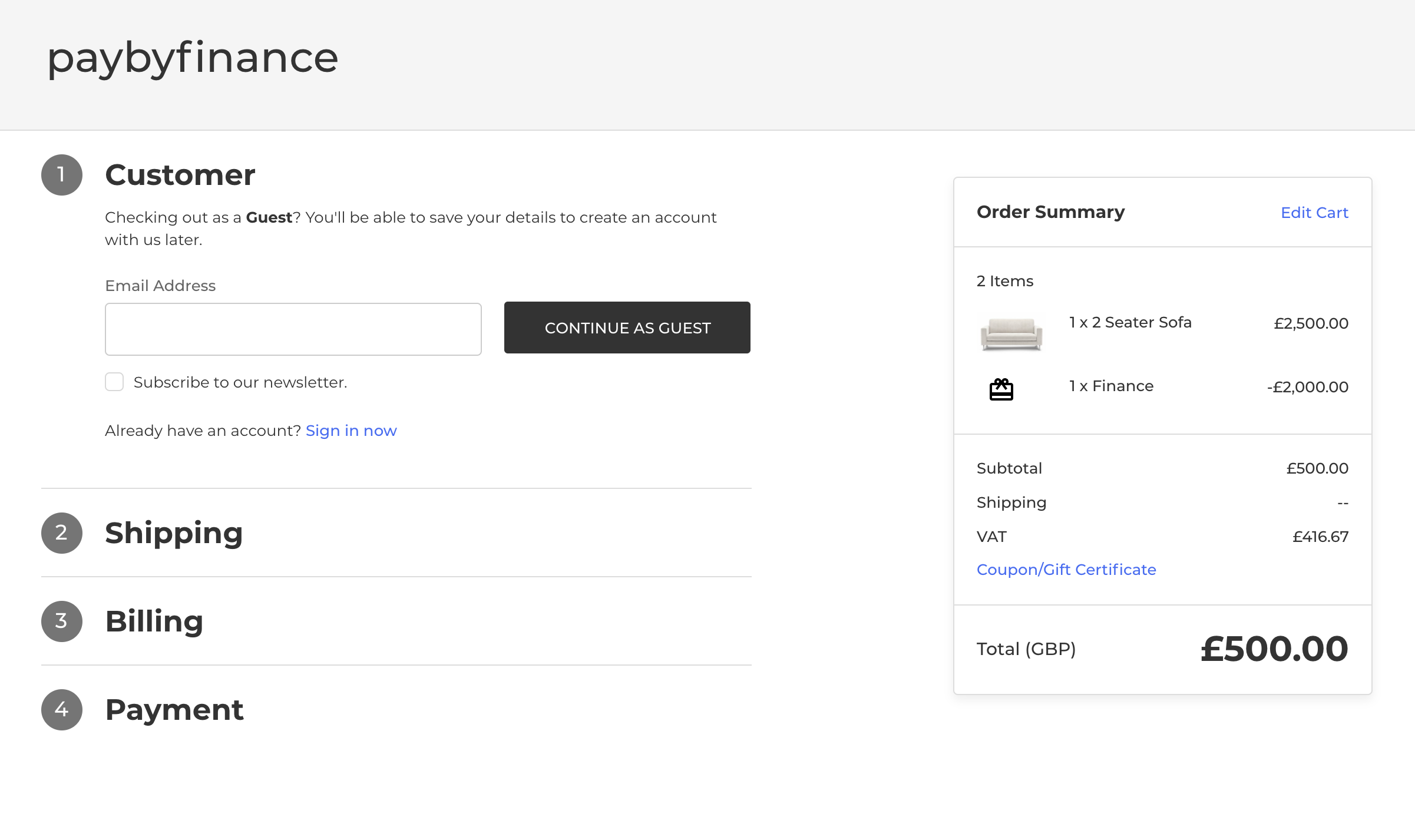
Success Page
After the user has paid for their £500 deposit, they still have £2000 to pay for. So on SAAS platforms like Shopify and BigCommerce this is where you can query a second custom script.
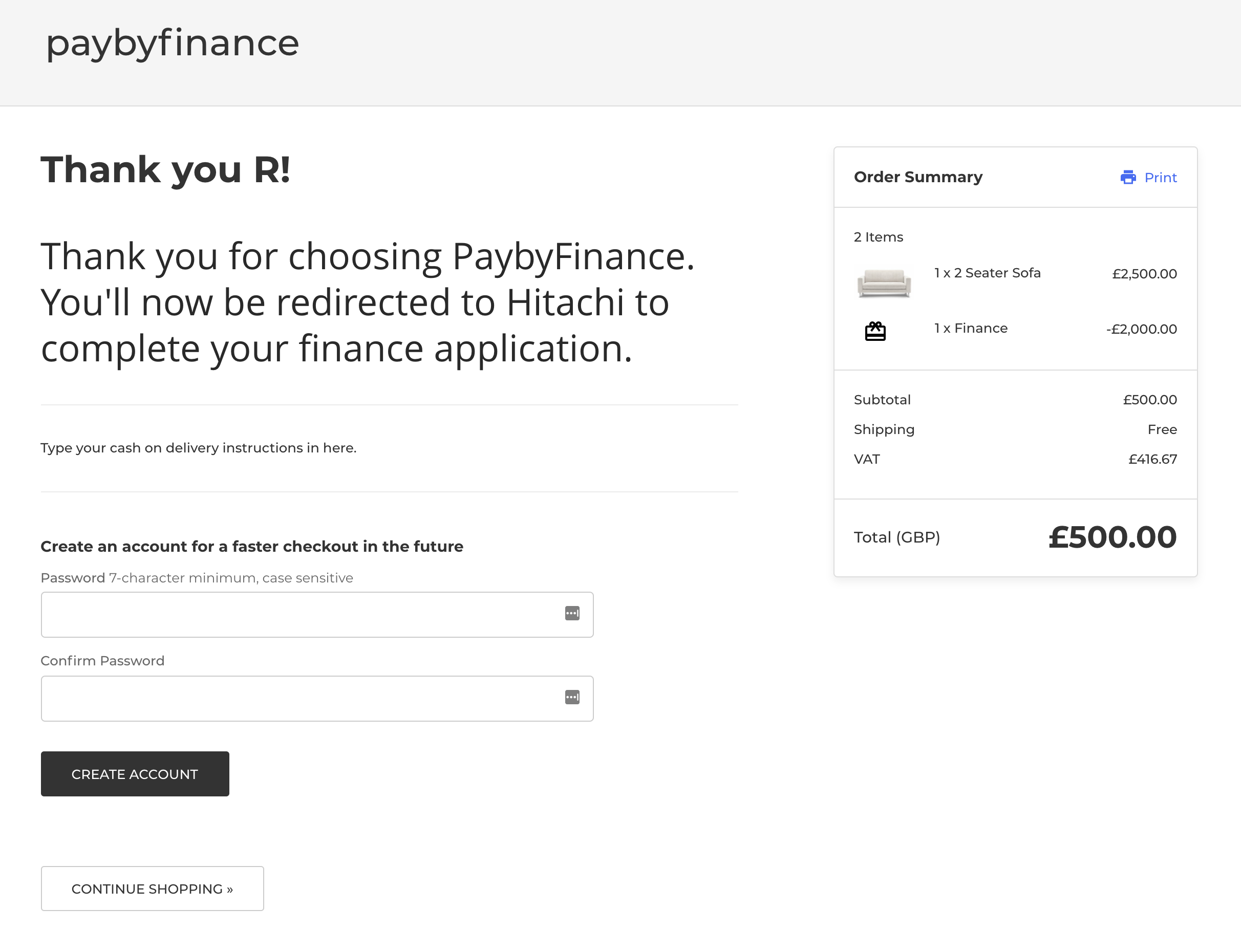
This script should be added to the order confirmation screen.
It waits until confirmation text has been loaded on the frontend, then it overwrites the text and asks our backend app for a link to CM3 to complete our finance application.
Insert in file: templates/pages/order-confirmation.html
<script>
    // The order confirmation text from bigcommerce is loaded as HTML after page load
    // in checkout.order_confirmation_content, so we need to wait until
    var checkExist = setInterval(function() {
        if (document.querySelector(".orderConfirmation-section")) {
            console.log("Process PBF");
            processPbf();
            clearInterval(checkExist);
        }
    }, 100); // check every 100ms

    function processPbf() {
        var hash = sessionStorage.getItem('pbf_hash');
        var order_id = '{{checkout.order.id}}';
        var additionalText = "";
        var params = getSearchParameters();

        var destElement = document.querySelector(".orderConfirmation-section");
        if (hash && !params['status']) {
            const Http = new XMLHttpRequest();
            var data = new FormData();
            data.append('hash', hash);
            data.append('order_id', order_id);
            Http.open('POST', 'https://bc-headless-demo.dbhq.tech/applypbf.php', true);
            Http.send(data);
            Http.onload = function(e) {
                let returnData = JSON.parse(Http.responseText);
                window.location.href = returnData.redirect_to;
            };
            additionalText = "You'll now be redirected to Novuna to complete your finance application.";
            destElement.innerHTML = "<h1>Thank you for choosing PaybyFinance. " + additionalText + "</h1>";
        }
        if (hash && params['status']) {
            if (params['status']) {
                additionalText = "Finance has been accepted.";
            } else {
                additionalText = "Finance has not been accepted. Finance status: " + params['status'];
            }
            destElement.innerHTML = "<h1>Thank you for choosing PaybyFinance. " + additionalText + "</h1>";
        }
    }

    function getSearchParameters() {
        var prmstr = window.location.search.substr(1);
        return prmstr != null && prmstr != "" ? transformToAssocArray(prmstr) : {};
    }

    function transformToAssocArray( prmstr ) {
        var params = {};
        var prmarr = prmstr.split("&");
        for ( var i = 0; i < prmarr.length; i++) {
            var tmparr = prmarr[i].split("=");
            params[tmparr[0]] = tmparr[1];
        }
        return params;
    }
</script>
Get CM3 url
By using the data from the BigCommerce order, and the signed finance details we stored earlier we can generate the CM3 link and pass this back so the user is redirected.
You will notice the checkout confirmation page now submits a request to our backend up https://bc-headless-demo.dbhq.tech/applypbf.php.
This request returns a redirect_to object containing our CM3 url that we redirect to.
User Completes CM3 as normal
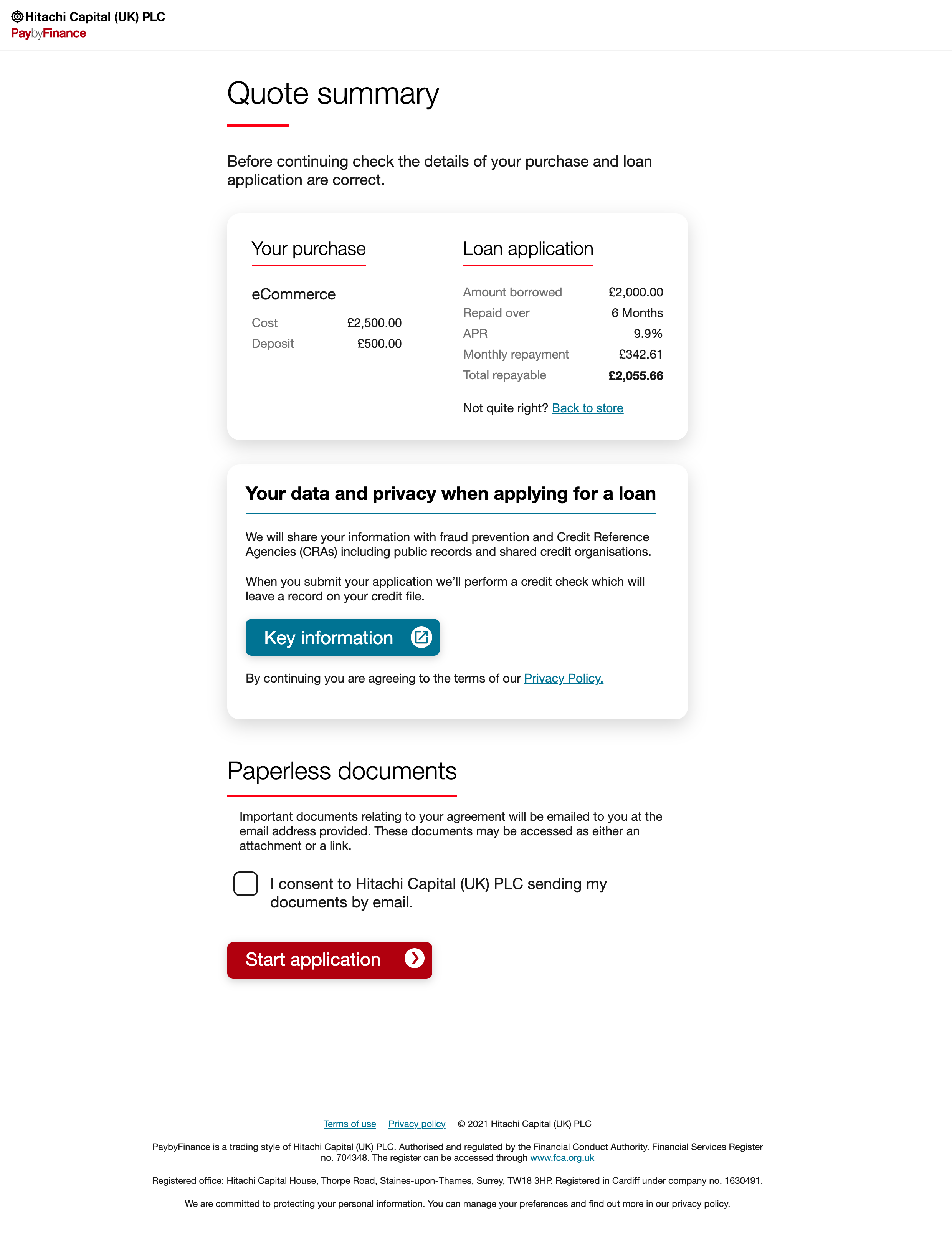
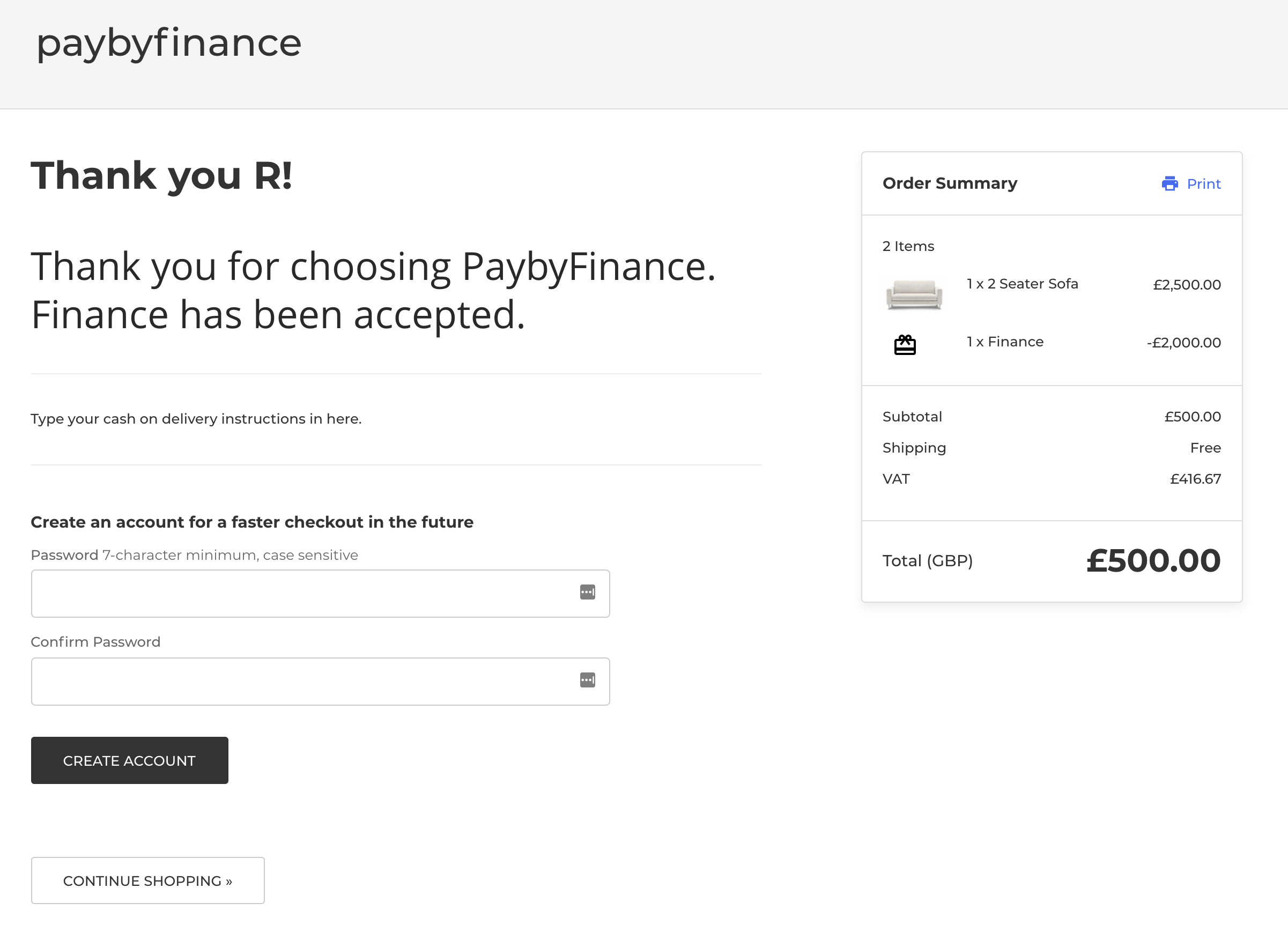
User redirected to BigCommerce, with the finance application status shown here
By using the code snippet we set up in the Success Page section, our confirmation page will now display the finance status returned from CM3.
Known Limitations
It is important to be aware of known limitations. SAAS platforms are quick to get started with but tricky to extend.
- Our pbf.php script creates a checkout URL for the customer to be redirected to, but if the customer navigates back to the store they will be able to amend their order including the "gift certificate" we are using for finance.
- While our signed hash helps mitigate the risk and keeps honest people honest, further work should be done to prevent the users from changing their order or gift certificate details after the checkout has been created.
- This demo app also doesn't utilise the CM3 webhook/notifications. So orders will need to be manually configured and updated in the BigCommerce admin panel after finance has been applied for.
- Because we are not utilising the notifications, this means fraud checks like confirming the users address are not being carried out either.
- You may wish to place additional PaybyFinance buttons through out the site to encourage customers to visit the cart page rather than going straight to checkout. If a customer goes straight to checkout then they will not be able to select PaybyFinance as an option.
- Only interest free and interest bearing are configured currently, you can map further services in lib/cm3.php in the getServiceId() function.
- This demo app has only been set up to work with simple products, and it would need further work to support configurable products.
Proudly developed by Digital Boutique